Dear all,
昨天那篇 USBasp 使用文章,是否讓各位有所幫助呢?
今天我們要講的部份是針對:
AVRISP mkII 與 AVR Studio 的使用設定
為什麼?
之前的文章不是已經教過怎麼安裝設定 AVRISP mkII 的驅動程式,
而且還可以利用 Arduino IDE 去燒錄更換新的 Bootloader ?
兩者不太一樣,之前的 AVRISP mkII 的驅動程式是使用 Arduino IDE 所提供的,
若要在 Arduino IDE 底下使用 AVRISP mkII 進行燒錄 Bootloader 或上傳 Sketch,
那就一定要使用 Arduino IDE 所提供的AVRISP mkII 驅動程式。
不過若要使用 AVR Studio 這套強大的編譯器去對 Atmega 2560 單晶片作更細微的 Fuse 設定,
那你非得要先移除原有 Arduino IDE 所提供的驅動程式,再另行安裝。
以下是原本使用 Arduion IDE 的驅動程式:
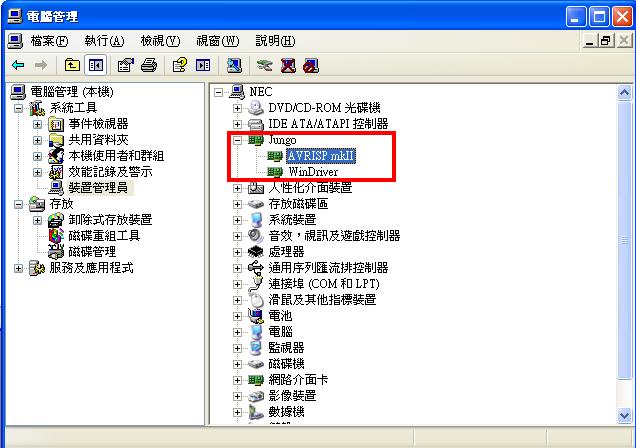
今天我們要更換成 AVR Studio 所提供的版本,安裝後應如下圖:
請注意: 如果沒有移除原有驅動程式,就直接安裝新版本驅動程式將如下圖,
請記得移除 LibUSB-Win32 Devices
以上是驅動安裝成功與否的檢查畫面,需要兩個驅動程式都是在 Jungo 底下,
請自行留意是否正確。
======================================================================
讓我們開始進入正題,帶著各位一步一步安裝 AVR Studio。
安裝前,請再確定一次你已經移除原有的 AVRISP mkII 驅動程式,
因為先行移除,才不會造成後續安裝的困擾。
在此我們示範的 AVR Studio ,是 : AVR Studio 4 ,
官方網站目前提供的版本是最新的 : AVR Studio 6。
點選執行 AVR Studio 4 後開啟畫面如下
點選: I accept the terms of the license agreement,並選擇安裝位置
安裝驅動程式。若之前的 AVRISP mkII 驅動程式你有移除,在此就可直接放心按 Next
確認並安裝
安裝完畢後,開啟 AVR Studio 4
開啟 AVR Studio 4 ,請於開啟檔案的詢問視窗點選:Cancle
在上方的 Toolbar 找到 AVR icon 後點選,如下圖
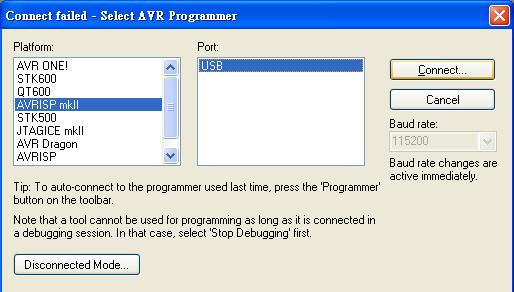
選擇燒錄器型號,以及連線方式
接下來就是我們的重頭戲啦,請各位看官們留神了!
1. 首先選擇 AVR 單晶片型號
2. 燒錄 Bootloader
請先按下 Erase Device,清除 AVR 單晶片上的舊有資料。
在 Flash 欄位選擇 Bootloader 來源位置,Bootloader 我們一樣選擇 Arduino IDE 提供的
筆者的Arduino 資料夾解壓縮後的位置是:C:\ ,因此Bootloader 的位置是:
C:\arduino-1.0.1\hardware\arduino\bootloaders\stk500v2\stk500boot_v2_mega2560.hex
請以自己的 Arduino 資料夾位置為主。選擇後按下 Program。
3. 調整 Fuse
燒錄完 Bootloader 後,還要調整 Fuse 的部份。
Fuse的調整可以讓 AVR 單晶片的每個腳位都能以正常的初始值進行工作。
請注意: 畫面中有一個 SPIEN 欄位,他的灰色方塊 『不可以取消勾選 』
因為若取消勾選,將保護模式,無法上傳程式與更新 Bootloader
上圖中有勾選的選項,我在下方列出:
BODLEVEL : Brown-out detection at VCC=2.7V
SPIEN : 勾選 (千萬要勾選)
BOOTSZ : Boot Flash size=4096 words start address=$1F000
BOOTRST : 勾選
SUT_CKSEL : Ext. Crystal Osc. 8.0- MHz; Start-up time: 16K CK + 65 ms
EXTENDED : 0xFD
HIGH : 0xD8
LOW : 0xFF
以上資料確定無誤後,按下 Program 即可
4. 設定 LOCKBIT
在這個頁面中,只需要針對中間空白區域,寫著 LOCKBIT 中的值作修正。
預設值若是 0xFF,請直接修改欄位中的值為 0x0F 或 0xCF,並將下方的 Verify 選項取消。
- 若輸入 0x0F,下方的 Verify 沒有取消的話,將會跳出警告視窗。當關閉警告視窗後,原本輸入 0x0F的值,會自動調整為 0xCF。
5. 設定自動燒錄
如果從第 1 步驟到第 4 步驟,你都有按部就班,基本上第 5 步驟是不需要的。
但若你很熟悉稍早那些設定後,若能在全部設定都設置好後 「 一鍵完成 」 ,
這豈不是很棒?
請按照下圖中的勾選設定,勾選完畢後,按下右下角的 Start,就完成全部的燒錄工作了!
到這恭喜各位已經完成在 AVR Studio 下針對 AVR 單晶片做好 Fuse 以及 LockBit 的設定,
好好享受你的實驗與冒險! Have fun !